The New Black

misterbell

The reviews are in…

1. “Easy enough to use so that a four-year-old could operate one”

2. The development included adapting it to distribute entertainment and news…

3. A review of it  highlighted its potential for widely distributing entertainment,

4. Individual homes had access to music 24-hours a day…

5. The potential existed for “half a million subscribers spread all over Europe”…

6. “I have often marveled why a country like the United States with its amazing enterprise and development has not produced one of its own…

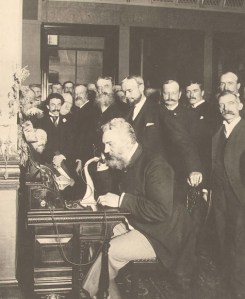
Nope, these are not reviews for the internet. It’s not a new social network and it not a general review of  social media.

They’re for the phone!

One has to wonder whether our ideas have really changed that much since the advent of the telephone. The ideas haven’t changed, just the means to communicate have.

Today, our online communications goals revolve around the following:

  • We want to talk-we want to be heard
  • We want to have conversations.
  • We want to distribute content to the masses
  • Entertainment, news and music
  • Keeping it simple.
  • We want to make money
  • Subscriptions models still make the most sense
  • The United States is still getting bashed for something.

What does this tell you? A lot has changed? Not much has changed? At the end of the day, we strive to communicate in the easiest most profound ways possible.

Our most basic human desire is still to talk and to listen. We are motivated to make it as  simple as possible to have a conversation. We are constantly pushing the envelope of ways to connect, to share and to listen to each other and others. Look at all the apps and programs that revolve around this notion. Simplifying our lives, consolidating our contacts, streamlining our relationships. All for the sake of communicating.

Isn’t it amazing that those 5 statements could have been made this past Monday? and yet it was over a 100 years ago! So what is your take-away from this post?

Talking and listening will always matter. We will always be captivated and motivated and willing to pay for entertainment and music. Keeping it simple is still a priority in our lives, and the only business model that appears to still make sense, is a subscription model. Ironic isn’t it?

<!– ckey=”11D222B7″ –>

Share this Post

Social media is free…but I’m not

free

It’s been one of those days… so I’m going to allow myself just a wee bit of time before I snap out of it.  I’m going to vent. It started this morning when I heard back from a prospective client who liked the 5 page social media strategy overview document but…

The “but” was they wanted more specific details on what I was going to do. I told them that I would give them the specifics in time. but that I thought that it was important that they understand the how and the why before we got into the how to and the what for. I did this because we’re talking about a client that knows virtually nothing about social media.

If I would have given them the latter, 2 things would have happened. 1)  It would have been so over their head that they would have not understood and probably bailed and or 2) Believe it or not, they could take the document and either try and implement it themselves, or use it as a blueprint with another company and leverage their new found knowledge. You might not think that happens, but it does, as well as some other things  Why?

The ease of entry into social media is less than zero. I can sign up for a majority of social networks in less than a minute. I can create social profiles in less time. So the assumption with a lot of companies and people is, “What is so hard about being social”? or creating a Facebook page, or a Twitter profile?and you know what? They are right. It’s easy.

Boom.

The thinking is really as simple as the majority of social interfaces that you see. Just create a profile and now you’re part of the social media revolution. You don’t need a consultant or a company to tell you how to do this. It’s easy. Plus there’s all of these killer blogs and sites with free information on social media, all these free tools, you can just figure all of it out on your own.

Sure. You can figure it out until it falls flat and you have one comment on your blog post. You have 19 registered members in your community, or you have 5,000 followers and you’re  following 5,000 but you have 111 tweets and zero conversations. Or maybe that Facebook page of yours has 56 fans but is doing nothing else. Or the YouTube video you made, has driven approximately 24 views.  When stuff is free, you get what you paid for.

There are some seriously smart people in this space. I value what they do and say and we value what we do and say, and we value what we create. But we also are working for a living. As much as we would like to give it away, we can’t. As it stands, the majority of people in this space, give away a lot. In fact, the amount of time that a lot of the social media marketing people that I know, give away, is extreme.  In terms of amounts of their time and resources-there is not a more giving  bunch. That’s the essence of social media.

But… at the end of the day, bills have to be paid and you’re going to have to take that leap of faith.

I’m done venting.

Share this Post

How are you driving people to your social media presence?

cattle

What are you planning to do to drive people to your social media presence? And do you have the money to do it? I read this question this morning and thought, boom, dude you nailed it. It was a post in Clickz by Sean Carton. Though he didn’t really answer it.

So lets talk about that. What are your plans? You have gotten the gig, but now you are tasked with driving traffic to all of the social media properties that you have set up for the client.

Quick question though. Is that really a function of social media managers? To drive traffic? Or is that a pure marketing function? A search function? Something you pay for? Something you outsource?

I digress. So what are you going to do get these communities/social media personas jammin?

I think first and foremost, as Jason Falls has so aptly put it,

To be effective in social media, whether as a marketer or just an ordinary participant, you must, first and foremost, communicate well.

Ok so you have that down, you can communicate with the best of them, now what?

Well if we’re to look at social media as a messaging and communications type of activity, wouldn’t that responsibility ultimately sit on the shoulders of PR? Should PR pros be responsible for driving traffic to social media networks?

Or is it something a marketing department should do? Does a community manager do that?

Wait, I’m blurring the message here. Let’s go back.

What are you going to do to drive traffic? I don’t care if you’re in marketing, PR, or IT, you have been tasked with making this social media thing work, so wutcha got? And don’t go telling me we need to define our objectives and align them with our strategies. We get that. Yea I know numbers don’t truly define success but they certainly are going to determine a lot of things going forward. So pick your poison.

  • We have blogs-what’s your plan to drive readers?
  • You’ve created a Facebook fan page or group page, how many friends are you going to get and then what will you do with them?
  • You’ve create a social network on Ning now what?
  • What is your plan to grow your Ning group or your community?
  • You’ve got that Twitter profile rolling, what’s your goal? Do numbers even mean anything anymore? How many conversations are you looking for?
  • Now that you have that podcast where are you going to find that audience? What is going to compel them to tune in every week?
  • Wikis are a cool collaborative tool if people know about them and feel compelled to contribute. So why should they do anything with yours? Out of some benevolent stroke of contributing for contribution’s sake?
  • Is a big budget going to make it easier for you to create these communities? You know once your PPC campaign ends, your traffic might leave to..
  • What if you do suck at communicating? Then what?
  • Who should be responsible for the success or failure?

What I keep coming back to, is that with each bullet point, it still helps to define the purpose of why you are doing it in the first place. Here’s the problem though. There are a lot of hours involved in any of these activities, and if any company or person is going to work on these, then we or you need to see something on the back end that is justifiable. Is that ROI? Could be. Is it return on engagement? Well…

Try selling the story that because of social media, you had one killer conversation or engagement per blog post. Or you have 30 really awesome friends on that Facebook fan page. Or you helped 1 customer out who found you through Twitter…

I’m not sure those type of numbers can justify the time suck and investment of resources.

So I ask you again, what is your plan of action for driving traffic to your social sites and communities.

How to strike the balance between your blog and Twitter

seesaw

Do you feel like Twitter is stealing the oomph from your blog? That you don’t blog as much as you used to? Yea me too. A lot of good topics get thrown under the 140 character bus in the form of epiphany like sound bites. So what do you do about it? How are you striking the balance between the 2? Are you on a schedule? Do you tweet at certain times?

How do you decide when to save that mind blowing tweet for a full blown blog post?

I used to blog every day, and now? 3 times a week. However there are days that I might write 3 blog posts in one day. Is that you? Here’s what might work for you. Because though I may be only blogging 3 times a week, I’m getting my source material from Twitter.

So though Twitter might be stealing some of my thunder, it is also creating the lightning for my blog posts.

Use Twitter as your source and inspiration for topics.

The real trick though, as has just been pointed out to me by@newjerseyliz, is how do you manage to read tweets, respond to tweets, read blog posts and respond to blog posts and write your own blog posts? And do it consistently. That’s why my Twitter network has evolved into my own personal RSS filter of what I should read. Maybe yours should too? Tell me what’s working for you.

Share this Post

Twitter Town Hall Takes Center Stage

tweettownhall

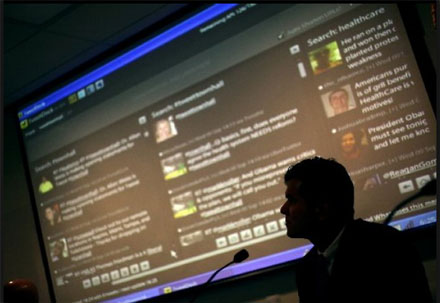
Twitter Town Hall,  a concept slowly starting to make sense, came roaring into the spotlight last night. At the epicenter of people who are most concerned about health care reform (senior citizens living in Florida) it became a little bit more magnified.

Last night, at the Naples Daily News headquarters, I had the pleasure to help manage with Cyndee Woolley, the “back channel” for a discussion on Health Care. However the difference was that this back channel was in the forefront.

Why? Because we took questions not only from the SRO crowd of almost 300, but also from the folks watching the stream live on their computers and participating via Twitter. Hyper local took on a whole new meaning.

You want to see Web 2.0 in action across multiple generations? We had it last night. Streaming video, Twitter, Facebook and 3 party applications all played out before the common people who wanted to hear and wanted to be heard.

Interestingly enough this was essentially the brainchild of one of Florida’s state representatives, Matt Hudson, who truly “gets” the power of social media. And because of social media, the event was organized very quickly, was very well attended, and it achieved it’s goal of informing as many people possible in as many ways as possible.

Here is NBC’s take on last night’s Twitter Town Hall

Here is the Local Fox affiliates take

Town Hall meetings might never be the same.

Social Media Conundrum #13…The tools

tools

Practical, useful, functional, sensible…

Those are all synonyms of a word that best fits social media. I’ll let you in on that word at the end of this.

I think sometimes we like to have things that look pretty, but don’t really perform that well, and yet we have tendency to accept it. We shrug our shoulders and we incorporate the time suck and the inconvenience into our daily routine.  I’m sure we can all think of products or services in social media that we bought or downloaded that had a lot of slick features, but at the end of the day, just didn’t work. But we stayed with it. Why? Because we were told it was the thing to do or have.

At the end of the day, we just needed it to do X instead of A through X. Even though K throught X doesn’t even work anyway without an upgrade.

Initially, we suffer for beauty, until we learn that practicality can go a long way in  online marketing and social media success.

Social media tools and sites are, at their core, about creating and enhancing the way we communicate with friends and strangers. The essence isn’t so much about how I say it and where I say it, as it is about what I say and to whom. It’s usefulness is only useful if you’re using it. We use the tools of social media to enhance and simplify and extend our communication and marketing efforts to customers, clients and friends and relatives. It’s a utility, and we use it as such. Whether we know it or not.

What’s my point?

Practical, useful, functional, and sensible can go a long way in social media. They also can a long way in enhancing the relationships with your customers and your clients. They don’t and you don’t for that matter, need the snake oil, the spam and the bullshit pitch. They need a social media solution or tool that is practical, useful, functional and makes sense for their employees, their company and their customers. So give it to them. and give it to yourself. Use what works.

The word?

Its Utilitarian.

Social media is utilitarian.

Do you agree?

101 Twitter Tools – an insane list

This is by far not the definitive list of Twitter tools, but it certainly has some tools and apps that you can benefit from. So Dig in and have at it..

Twitter Stats | Monitoring | Alerts

  1. Twitter Grader: Learn yr twttr grade, yr local twttr Elite, & find new ppl 2 follow through twttr Grader.
  2. Twitterholic: Check out the top twttr users & find out yr twttr stats on Twitterholic.
  3. TweetStats: TweetStats offers a graphical analysis of yr twttr stats.
  4. Twitter Friends: Carefully measure yr twttr conversations using twttr Friends.
  5. Twinfluence: Twinfluence will measure yr twttr influence based on reach, velocity, & social capital.
  6. Tweetwasters: Find out how much time U & other users waste on twttr.
  7. Tweet-Rank: Learn abt the quality of yr tweets by finding out which ones won or lost followers.
  8. Mr. Milestone: Get a tweet when U reach various milestones using ths twttr tool.
  9. Retweetrank: Find out how many retweets U & other twttr users have through ths service

Information Gathering | Polling | Voting | Debate | Contests

  1. @myflightinfo: Use @myflightinfo 2 stay updated on yr flight’s status.
  2. Twitterverse: Check out archived timelines & tweets through Twitterverse.
  3. Twitscoop: Twitscoop shares what’s hot on twttr at any given moment.
  4. Twitbuzz: Twitbuzz tracks the latest conversations as well as popular twttr links.
  5. StrawPoll: Use StrawPoll 2 make sharing yr opinion as easy as sending an @reply.
  6. Retweetist: ths service ranks the hottest links being retweeted on twttr.
  7. Monitter: Get real time keyword monitoring on twttr from Monitor.
  8. TweetNews: TweetNews ranks stories based on the amount of related tweets.
  9. TwitterBuzz: TwitterBuzz will tell U what’s being linked 2 the most on twttr.
  10. Tweetscan: Set up Tweetscan 2 make sure U don’t miss any @replies, & 2 get alerted of yr search queries.

Network Building | Management | Follow | Find

  1. Twitter Local: w/ ths service, U cn C tweets from twttr users in a specific location.
  2. Twubble: Twubble will expand yr twttr bubble, picking out ppl U may lk 2 follow.
  3. MyCleenr: Sort yr friends by their last tweets, & U cn get rid of the inactive & useless accounts you’re following.
  4. Follow Cost: ths tool will tell U how much effort it takes 2 follow sum1.
  5. Tweepler: Use Tweepler 2 organize yr tweeps based on whether you’re following them or not.
  6. Just Tweet It: Find Tweeple, tools, twttr bots & more through ths directory.
  7. TweetWheel: TweetWheel will help U discover which of yr twttr friends know each other.
  8. SocialToo: SocialToo will help U keep track of all of the ppl who have followed or unfollowed U.
  9. Twitoria: Reduce yr clutter on twttr by finding yr friends that haven’t tweeted in a long time.
  10. TwitDir: w/ TwitDir, you’ll B able 2 search 4 ppl, & exploring categories including top followers & updaters.
  11. Who Should I Follow?: Using ths site, U cn get gd recommendations 4 Tweeps 2 follow.
  12. Nearbytweets: Learn abt all of the twttr users in a specific area w/ the help of Nearbytweets.
  13. Twellow: Find twttr users in a specific industry using ths service.
  14. Mr. Tweet: Mr. Tweet is a personal networking assistant 4 twttr, helping U find relevant followers.
  15. Qwitter: Qwitter will help U manage yr network by sending an alert when a person unfollows U.

Twitter Management | Apps | Interface

  1. Summize: Retrieve information on twttr quickly 2 search twttr in real time.
  2. Tweet O’Clock: Trying 2 reach sum1? Tweet O’Clock will help U find the best time 2 get their attention.
  3. Just Signal: Set up a filter using Just Signal 2 get only the tweets that discuss the keywords you’d lk 2 read abt.
  4. TweepSearch: Put yr twttr network 2 gd use & search yr followers 4 specific parameters.
  5. Friend or Follow: Manage yr twttr contacts & find out who’s not following U back through Friend or Follow.
  6. TwitResponse: TwitResponse makes it easy 4 U 2 schedule the delivery of yr tweets ahead of time.
  7. TwitterSnooze: Put the pause button on a particular user 4 a while w/ twttr Snooze.
  8. Twitterless: Get notified when sum1 stops following U w/ Twitterless.
  9. Twilert: Track specific keywords 2 receive alerts 4 using Twilert.
  10. Tweetdeck: Tweetdeck has a groups fcn that will help U more efficiently follow the ppl U rlly wnt 2 listen 2.
  11. Twalala: Put the mute button on certain ppl & topics 4 a while if U R receiving lots of updates you’re not rlly interested in.

Sharing Tools | Multi-Media | Pics | Videos

  1. Tweetburner: Use Tweetburner 2 share links, & U cn track their usage.
  2. Twitpic: Twitpic makes it easy 2 take mobile phn photos & share them using yr twttr acct.
  3. TwitterHawk: Get targeted marketing on twttr through TwitterHawk.
  4. Acamin: Acamin makes it easy 2 share files on twttr w/ yr followers.
  5. Glue: Post links 2 books, movies, restaurants & more on twttr through Glue.
  6. Ping.fm: ths service will update all of yr social networks at once.
  7. TweeTube: TweeTube makes it easy 2 share videos on twttr.
  8. twiggit: Use ths automated service 2 share the articles U digg on twttr.
  9. Twisten.fm: Share wht yo u’re listening 2 on twttr through Twisten.fm.

Organization | Productivity | Social Profiles

  1. Twittercal: Link yr twttr acct & Google Calendar 2 easily keep up w/ yr events & appointments.
  2. Timer: Use Timer 2 get reminders abt t asks through yr twttr acct.
  3. TwitterNotes: Organize yr notes using twttr w/ TwitterNotes.
  4. Remember the Milk: Use Remember the Milk on twttr 2 update yr 2 do list.
  5. Tweetake: Tweetake will back up yr twttr timeline 4 archiving & more.
  6. Nozbe: Nozbe makes it easy 2 add & update yr 2 do list on twttr.
  7. Toodledo: ths popular 2 do list app integrates nicely w/ twttr.
  8. TrackThis: Send TrackThis yr tracking number, & you’ll get twttr messages every time there’s a change in location.
  9. Joint Contact: Get project management productivity on twttr using Joint Contact.
  10. Tempo: ths time tracking tool allows U 2 send in updates from twttr.
  11. Tweet Later: Tweet l8r offers a gr8 way 2 set up alerts, schedule tweets, send thank U DMs, & more.
  12. OutTwit: OutTwit will make it easy 4 U 2 use twttr inside of Outlook.
  13. Jott: Jott makes it easy 4 U t o tweet w/out evr having 2 type, transcribing yr voice msg 2 twttr.

Life Tools | Bots | Fun

  1. MyMileMarker: Keep track of yr mileage w/ info sent via twttr every time U fill up.
  2. 21Tweets: 21Tweets offers personal coaching on twttr.
  3. TwtTRIP: Organize yr travel plans & find other twttr travelers on yr way w/ TwtTRIP.
  4. Tweet Answers: twttr Answers makes it easy 2 ask questions & get answers on twttr.
  5. Twtvite: Twtvite is a simple event organizer that will help U create a tweetup.
  6. Vacatweet: Set up an autoresponder 4 yr twttr acct w/ Vacatweet.
  7. plusplusbot: Share when sum1 goes out of their way 2 help U, or otherwise make yr feelings known using plusplusbot.
  8. TrackDailyGoals: Use ths site & the #dailygoals hashtag 2 keep track of yr goals every day.
  9. ConnectTweet: Put the voices of yr group or business tgthr through ConnectTweet.
  10. Tweeteorology: Find tweets abt the weather in any location through Tweeteorology.
  11. DreamTweet: Keep a reminder of yr dreams & nightmares, & follow the dreams of others through DreamTweet.

Business | Finance | Money

  1. Chipin: If you’re raising funds on twttr, make use of Chipin 2 set a goal & let yr supporters track the progress of the campaign.
  2. Xpenser: U cn twttr yr expenses 2 Xpenser & they will B recorded 4 U.
  3. Twittertise: Schedule your tweets and track their clickthroughs with this app designed for Twitter advertising.
  4. TwtQpon: Schedule yr tweets & track their clickthroughs w/ ths app designed 4 twttr advertising.
  5. CheapTweet: Get all of the deals, sales, coupons & more being discussed on twttr through CheapTweet.
  6. Tipjoy: lk Chipin, Tipjoy offers a way 2 create social payments 4 yr cause, content, or ppl.
  7. SalesTwit: Get contact management 4 twttr w/ the help of SalesTwit.
  8. Tweet What You Spend: Track yr cash in a rlly effective way using Tweet wht U Spend.
  9. StockTwits: StockTwits shares the investment discussions on twttr in real time.

Health | Fitness | Everyday Apps

  1. Qwitter: Update Qwitter 2 shame yourself in2 quitting smoking.
  2. TweetPlot: Use TweetPlot 2 chart yr food & fitness statistics.
  3. Tweetwhatyoueat: Keep a food diary 2 track wht you’re eating every day using Tweetwhatyoueat.
  4. gtFtr: Use the gtFtr tool to record your exercise activity on Twittr.
  5. SugarStats: Track, monitor, & share yr blood sugar through twttr w/ SugarStats.
  6. FoodFeed: ths twttr-based food log makes it easy 4 U 2 track wht you’re eating.

News Gathering | Research | Feeds | RSS

  1. Add to Any: Get yr posts shared on twttr by using Add 2 Any on yr WordPress blog.
  2. TwitThis: Make use of ths plugin 2 send twttr messages abt yr blog post.
  3. MyTwitter: Use the MyTwitter plugin 2 display yr twttr status on WordPress.
  4. Twitpress: Twitpress will send out a Tweet every time U post a new blog entry.
  5. TwitterCounter: w/ ths plugin, U cn display the number of followers U have on twttr.
  6. TwitterFeed: Announce yr blog post on twttr w/ a customized msg using TwitterFeed.
  7. FriendFeed: Announce your blog post on Twitter.

Posted via web from marcmeyer’s posterous

Share this Post

Contribute to or Contaminate the Conversation

In social media

bubble

It’s your choice…

🙂

Listen and Learn: New Media, New Metrics-@ambercadabra is wayy to smart for me! Thanks @bethharte

I would highly suggest following the Uber smart Amber Naslund on Twitter @ambercadabra

Posted via web from marcmeyer’s posterous

Ben Harper and Relentless7 PR-do these type of paragraphs just get reused?

In a hostile sea of disposable, throwaway singles, BEN HARPER AND RELENTLESS7 have made a true album. White Lies For Dark Times is a timeless rock record, with a cohesive collection of music that is as raw, unrelenting and thunderous, as it is arrestingly haunting and emotional.

As much as I dig Ben Harper (I’ve seen him in concert at least 6-7 times) The hype/PR in this statement makes me chuckle. Can’t they just say the latest release is pretty damn good?

Posted via web from marcmeyer’s posterous