Twitter Town Hall Takes Center Stage

tweettownhall

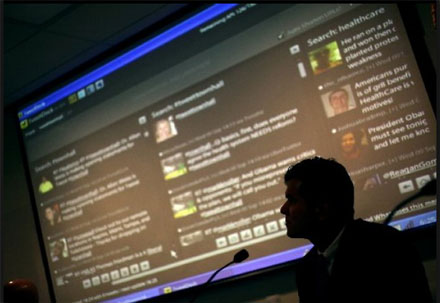
Twitter Town Hall,  a concept slowly starting to make sense, came roaring into the spotlight last night. At the epicenter of people who are most concerned about health care reform (senior citizens living in Florida) it became a little bit more magnified.

Last night, at the Naples Daily News headquarters, I had the pleasure to help manage with Cyndee Woolley, the “back channel” for a discussion on Health Care. However the difference was that this back channel was in the forefront.

Why? Because we took questions not only from the SRO crowd of almost 300, but also from the folks watching the stream live on their computers and participating via Twitter. Hyper local took on a whole new meaning.

You want to see Web 2.0 in action across multiple generations? We had it last night. Streaming video, Twitter, Facebook and 3 party applications all played out before the common people who wanted to hear and wanted to be heard.

Interestingly enough this was essentially the brainchild of one of Florida’s state representatives, Matt Hudson, who truly “gets” the power of social media. And because of social media, the event was organized very quickly, was very well attended, and it achieved it’s goal of informing as many people possible in as many ways as possible.

Here is NBC’s take on last night’s Twitter Town Hall

Here is the Local Fox affiliates take

Town Hall meetings might never be the same.

101 Twitter Tools – an insane list

This is by far not the definitive list of Twitter tools, but it certainly has some tools and apps that you can benefit from. So Dig in and have at it..

Twitter Stats | Monitoring | Alerts

  1. Twitter Grader: Learn yr twttr grade, yr local twttr Elite, & find new ppl 2 follow through twttr Grader.
  2. Twitterholic: Check out the top twttr users & find out yr twttr stats on Twitterholic.
  3. TweetStats: TweetStats offers a graphical analysis of yr twttr stats.
  4. Twitter Friends: Carefully measure yr twttr conversations using twttr Friends.
  5. Twinfluence: Twinfluence will measure yr twttr influence based on reach, velocity, & social capital.
  6. Tweetwasters: Find out how much time U & other users waste on twttr.
  7. Tweet-Rank: Learn abt the quality of yr tweets by finding out which ones won or lost followers.
  8. Mr. Milestone: Get a tweet when U reach various milestones using ths twttr tool.
  9. Retweetrank: Find out how many retweets U & other twttr users have through ths service

Information Gathering | Polling | Voting | Debate | Contests

  1. @myflightinfo: Use @myflightinfo 2 stay updated on yr flight’s status.
  2. Twitterverse: Check out archived timelines & tweets through Twitterverse.
  3. Twitscoop: Twitscoop shares what’s hot on twttr at any given moment.
  4. Twitbuzz: Twitbuzz tracks the latest conversations as well as popular twttr links.
  5. StrawPoll: Use StrawPoll 2 make sharing yr opinion as easy as sending an @reply.
  6. Retweetist: ths service ranks the hottest links being retweeted on twttr.
  7. Monitter: Get real time keyword monitoring on twttr from Monitor.
  8. TweetNews: TweetNews ranks stories based on the amount of related tweets.
  9. TwitterBuzz: TwitterBuzz will tell U what’s being linked 2 the most on twttr.
  10. Tweetscan: Set up Tweetscan 2 make sure U don’t miss any @replies, & 2 get alerted of yr search queries.

Network Building | Management | Follow | Find

  1. Twitter Local: w/ ths service, U cn C tweets from twttr users in a specific location.
  2. Twubble: Twubble will expand yr twttr bubble, picking out ppl U may lk 2 follow.
  3. MyCleenr: Sort yr friends by their last tweets, & U cn get rid of the inactive & useless accounts you’re following.
  4. Follow Cost: ths tool will tell U how much effort it takes 2 follow sum1.
  5. Tweepler: Use Tweepler 2 organize yr tweeps based on whether you’re following them or not.
  6. Just Tweet It: Find Tweeple, tools, twttr bots & more through ths directory.
  7. TweetWheel: TweetWheel will help U discover which of yr twttr friends know each other.
  8. SocialToo: SocialToo will help U keep track of all of the ppl who have followed or unfollowed U.
  9. Twitoria: Reduce yr clutter on twttr by finding yr friends that haven’t tweeted in a long time.
  10. TwitDir: w/ TwitDir, you’ll B able 2 search 4 ppl, & exploring categories including top followers & updaters.
  11. Who Should I Follow?: Using ths site, U cn get gd recommendations 4 Tweeps 2 follow.
  12. Nearbytweets: Learn abt all of the twttr users in a specific area w/ the help of Nearbytweets.
  13. Twellow: Find twttr users in a specific industry using ths service.
  14. Mr. Tweet: Mr. Tweet is a personal networking assistant 4 twttr, helping U find relevant followers.
  15. Qwitter: Qwitter will help U manage yr network by sending an alert when a person unfollows U.

Twitter Management | Apps | Interface

  1. Summize: Retrieve information on twttr quickly 2 search twttr in real time.
  2. Tweet O’Clock: Trying 2 reach sum1? Tweet O’Clock will help U find the best time 2 get their attention.
  3. Just Signal: Set up a filter using Just Signal 2 get only the tweets that discuss the keywords you’d lk 2 read abt.
  4. TweepSearch: Put yr twttr network 2 gd use & search yr followers 4 specific parameters.
  5. Friend or Follow: Manage yr twttr contacts & find out who’s not following U back through Friend or Follow.
  6. TwitResponse: TwitResponse makes it easy 4 U 2 schedule the delivery of yr tweets ahead of time.
  7. TwitterSnooze: Put the pause button on a particular user 4 a while w/ twttr Snooze.
  8. Twitterless: Get notified when sum1 stops following U w/ Twitterless.
  9. Twilert: Track specific keywords 2 receive alerts 4 using Twilert.
  10. Tweetdeck: Tweetdeck has a groups fcn that will help U more efficiently follow the ppl U rlly wnt 2 listen 2.
  11. Twalala: Put the mute button on certain ppl & topics 4 a while if U R receiving lots of updates you’re not rlly interested in.

Sharing Tools | Multi-Media | Pics | Videos

  1. Tweetburner: Use Tweetburner 2 share links, & U cn track their usage.
  2. Twitpic: Twitpic makes it easy 2 take mobile phn photos & share them using yr twttr acct.
  3. TwitterHawk: Get targeted marketing on twttr through TwitterHawk.
  4. Acamin: Acamin makes it easy 2 share files on twttr w/ yr followers.
  5. Glue: Post links 2 books, movies, restaurants & more on twttr through Glue.
  6. Ping.fm: ths service will update all of yr social networks at once.
  7. TweeTube: TweeTube makes it easy 2 share videos on twttr.
  8. twiggit: Use ths automated service 2 share the articles U digg on twttr.
  9. Twisten.fm: Share wht yo u’re listening 2 on twttr through Twisten.fm.

Organization | Productivity | Social Profiles

  1. Twittercal: Link yr twttr acct & Google Calendar 2 easily keep up w/ yr events & appointments.
  2. Timer: Use Timer 2 get reminders abt t asks through yr twttr acct.
  3. TwitterNotes: Organize yr notes using twttr w/ TwitterNotes.
  4. Remember the Milk: Use Remember the Milk on twttr 2 update yr 2 do list.
  5. Tweetake: Tweetake will back up yr twttr timeline 4 archiving & more.
  6. Nozbe: Nozbe makes it easy 2 add & update yr 2 do list on twttr.
  7. Toodledo: ths popular 2 do list app integrates nicely w/ twttr.
  8. TrackThis: Send TrackThis yr tracking number, & you’ll get twttr messages every time there’s a change in location.
  9. Joint Contact: Get project management productivity on twttr using Joint Contact.
  10. Tempo: ths time tracking tool allows U 2 send in updates from twttr.
  11. Tweet Later: Tweet l8r offers a gr8 way 2 set up alerts, schedule tweets, send thank U DMs, & more.
  12. OutTwit: OutTwit will make it easy 4 U 2 use twttr inside of Outlook.
  13. Jott: Jott makes it easy 4 U t o tweet w/out evr having 2 type, transcribing yr voice msg 2 twttr.

Life Tools | Bots | Fun

  1. MyMileMarker: Keep track of yr mileage w/ info sent via twttr every time U fill up.
  2. 21Tweets: 21Tweets offers personal coaching on twttr.
  3. TwtTRIP: Organize yr travel plans & find other twttr travelers on yr way w/ TwtTRIP.
  4. Tweet Answers: twttr Answers makes it easy 2 ask questions & get answers on twttr.
  5. Twtvite: Twtvite is a simple event organizer that will help U create a tweetup.
  6. Vacatweet: Set up an autoresponder 4 yr twttr acct w/ Vacatweet.
  7. plusplusbot: Share when sum1 goes out of their way 2 help U, or otherwise make yr feelings known using plusplusbot.
  8. TrackDailyGoals: Use ths site & the #dailygoals hashtag 2 keep track of yr goals every day.
  9. ConnectTweet: Put the voices of yr group or business tgthr through ConnectTweet.
  10. Tweeteorology: Find tweets abt the weather in any location through Tweeteorology.
  11. DreamTweet: Keep a reminder of yr dreams & nightmares, & follow the dreams of others through DreamTweet.

Business | Finance | Money

  1. Chipin: If you’re raising funds on twttr, make use of Chipin 2 set a goal & let yr supporters track the progress of the campaign.
  2. Xpenser: U cn twttr yr expenses 2 Xpenser & they will B recorded 4 U.
  3. Twittertise: Schedule your tweets and track their clickthroughs with this app designed for Twitter advertising.
  4. TwtQpon: Schedule yr tweets & track their clickthroughs w/ ths app designed 4 twttr advertising.
  5. CheapTweet: Get all of the deals, sales, coupons & more being discussed on twttr through CheapTweet.
  6. Tipjoy: lk Chipin, Tipjoy offers a way 2 create social payments 4 yr cause, content, or ppl.
  7. SalesTwit: Get contact management 4 twttr w/ the help of SalesTwit.
  8. Tweet What You Spend: Track yr cash in a rlly effective way using Tweet wht U Spend.
  9. StockTwits: StockTwits shares the investment discussions on twttr in real time.

Health | Fitness | Everyday Apps

  1. Qwitter: Update Qwitter 2 shame yourself in2 quitting smoking.
  2. TweetPlot: Use TweetPlot 2 chart yr food & fitness statistics.
  3. Tweetwhatyoueat: Keep a food diary 2 track wht you’re eating every day using Tweetwhatyoueat.
  4. gtFtr: Use the gtFtr tool to record your exercise activity on Twittr.
  5. SugarStats: Track, monitor, & share yr blood sugar through twttr w/ SugarStats.
  6. FoodFeed: ths twttr-based food log makes it easy 4 U 2 track wht you’re eating.

News Gathering | Research | Feeds | RSS

  1. Add to Any: Get yr posts shared on twttr by using Add 2 Any on yr WordPress blog.
  2. TwitThis: Make use of ths plugin 2 send twttr messages abt yr blog post.
  3. MyTwitter: Use the MyTwitter plugin 2 display yr twttr status on WordPress.
  4. Twitpress: Twitpress will send out a Tweet every time U post a new blog entry.
  5. TwitterCounter: w/ ths plugin, U cn display the number of followers U have on twttr.
  6. TwitterFeed: Announce yr blog post on twttr w/ a customized msg using TwitterFeed.
  7. FriendFeed: Announce your blog post on Twitter.

Posted via web from marcmeyer’s posterous

Share this Post

Context is a 4 letter word…

Actually it’s a seven letter word… but maybe the context was lost in the title.  Simply put. We need more context in social media conversations. Specifically in Twitter but certainly not immune to all other social networks, context can elude us quite easily.  Either we abuse it, we don’t use it, we misuse it, or we lose it. Alot!

context

Just as the earth revolves around the sun and rotates on it’s access, context continues to toss, turn and tumble around the foundations of conversations. Word has it that the phone works pretty well at restoring context. TBD. What do you think?

Share this Post

Opportunity Cost of Twitter

cash

I can pick up the phone and make a cold call and talk to someone who I might be able to get business from; or I can create a Twitter account and follow people who I might be able to get business out of.

The next best thing that a person can engage in is referred to as the opportunity cost of doing the best thing (more desirable) and ignoring the next best thing to be done.

So which is the best thing? Which is more effective?

Opportunity cost is a key concept in economics because it implies the choice between desirable, yet mutually exclusive results. Which is desirable? Making a cold call or reaching out via Twitter to someone you might get business from? Which is a more effective use of your time? Are the results mutually exclusive? Maybe. But not immediate.

The notion of opportunity cost plays a crucial part in ensuring that scarce resources are used efficiently. If I have 2 phones and 2 computers with 2 Twitter accounts-which will be more efficient in the long run? Or the short run for that matter.

You see, opportunity costs are not restricted to monetary or financial costs:  it can be the real cost of  lost output or lost time. Twitter can be quite  inefficient when it comes to working it into the prospecting flow of your work day and treating it like you would your outbound marketing. You have to know how to use it correctly. It compliments, but it doesn’t replace.

Try selling that to an SMB

Why your Twitter pitches just got easier…

newtwit

Finally. Now you can wow your prospects and clients with conversations about you, your peers, your product, your company, your industry, and your competition right at the beginning of your pitch. Finally, people will not be spooked by the ambiguity of the “old” Twitter home page. The barrier to kick the tires has just been lowered.

Share this Post

When the tweet doesn’t live up to the hype

play_risk

What do you, what can you do? You click on a compelling tweet with a link and it brings you to a lame blog post or just bad content. You took the link bait. What do you do? You read it and you say to yourself this is bullshit. It has a lot to do with credibility going forward doesn’t it? You feel like a sucker.

Trust? Your trust of who sent the link is diminished. Your skepticism for any subsequent posts is raised and the likelihood of ever going back to that blog and or to even follow that Tweeter is in jeopardy. So is this you? Are you the offender? If it is, here is one piece of advice. We’re not that stupid.

Don’t play us.


Share this Post

Twitter 101 is good but…

This week Twitter released Twitter 101-Best Practices for Businesses on Twitter and while it is a great site/primer on the how and whys of twitter- we’re still missing a fundamental component that escapes most first time users.

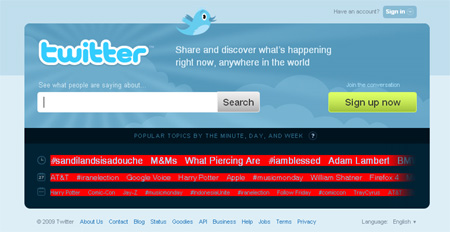
This is the entry page to Twitter

twitUI

The link for Twitter 101 is buried in the footer. A lot of people work on this premise: Ready, Fire, Aim. And this UI, now going on 3+ years needs to be retired. Now granted the notion could be, “we may complicate matters by displaying the Twitter 101 link prominently”..thus losing people who inherently sign up and register on anything that smells of  a social network. But let’s be honest, the only sight I know of where less is more is…

google_logo2It’s time for Twitter to grow up, you’re not the cool little startup anymore. I know you’re having scalability issues and you’re the darling of mainstream media. All good problems to have but…You do want to make money at some point, right? Well it starts with a first impression. So although Twitter 101 is a step in the right direction, it’s not a landing page.

Share this Post

My seminal moment for Twitter

idea_bulb

As I sat with a client yesterday explaining Twitter, something significant happened. I was broadsided by my complete and utter sense of hypocrisy-I told the client, who is the largest manufacturer of a certain niche based consumer product, to use Twitter strictly as a broadcast based one way communication tool. Huh?

On the surface, for some of you, that might not seem like such a big deal. However, for the better part of the last 12+ months, I have been waxing philosophically here, and telling people and clients and whoever would listen, that “Twitter is a two way communications tool to create, share, and nurture ideas, conversations and resources.”

You see, for this client, it makes more sense to just Tweet deals and sales for those that are, or might be, looking for the keywords that surround their products, instead of trying to engage in conversations. The reality is that for them, conversations on a day to day basis, both internally and externally revolve around…sales. They have products that don’t require a whole lot of pitch. Short to zero sales cycle. You either want it or you don’t. Why do they need to get to know a customer that knows what they are looking for?  For these people, Twitter would be more of a sales tool, a recommendation engine and a conduit to a product that once they find, they buy. So why not just tweet deals and sales?

That’s what I thought.

Simply put, it dawned on me that the usage of Twitter for certain clients will not necessarily adhere to a standard set of rules for engagement. The only thing that is etched in stone is the ambiguity on how to use Twitter. And maybe, just maybe, that is the beauty of Twitter.

Share this Post

The Twitter lifecycle

I was recently talking with Chris Abraham about the types of people that use Twitter; and yes I know that there have been lots of blog posts on the subject. But I’m a simple person who likes things to not be too complicated so I decided to take our conversation and dumb it down into three distinct types of users. There could be more but that’s for you to decide.

twitter-life

I look at Twitter Leaders to be those that: Engage others, that ask questions, that announce and alert others about upcoming events. They forward information that can help people. They Retweet info and tweets that are worth sharing. They share links and otherwise do the best they can about engaging worthwhile tweets, but they also have conversations, they bring value. In other words they are leaders.

Repeaters are just going to be forwarding and Retweeting machines. They are not so much into conversing as they are into giving off the semblance of having conversations. They will just read something and supply a link, read and retweet. They may give credit as to the source, they may not. They are using Twitter but they don’t know why. or they think they are using it properly but in actuality, they are not. They might be earnest, but they just don’t get it. They need to understand how to utilize it’s true potential.

The Feeders, might be better associated with bottom feeders. They are just taking whatever they “think” they can get from Twitter. They could care less about conversations. A sample bio from this type might be a cute name, or a company name associated with about 5 or 6 titles, one of which might be the word expert or ninja, and the Follower/Following/Tweets ratio will look something like this 200/5000/53. When looking at the tweets, you’ll see nothing of value and lots of messages that resemble some type of Google Adwords campaign. Zero value, zero relevance and ultiimately zero return on their time and effort.

What others could we add to this list?

Share this Post

10 quick ways for brands to change their monologue on Twitter

huck

As more and more companies continue to swarm to Twitter, all trying to see what the buzz is about, there are plenty that are using it now that are just not utilizing it correctly.  So here’s a quick primer. These are 10 sure-fire ways to change the monologue to dialogue real quick.

Instead of telling us how great your company is, Respond/Reply to someone else’s tweet to keep the conversation going.

Rather than push your standard one-way message, Retweet something that could have value for others.

Retell some information that perhaps someone missed that can save them time or possibly money-they’ll appreciate it!

If someone shared some information for your benefit, maybe others could benefit from it too. Why no Reshare it?

You see a person asking a question, you know the answer, Reach out to them and answer it!

Don’t always take, try being a Resource to your network or your existing customers sometime.

You get more out of Twitter if you realize that it’s as much about Reciprocity as it is anything else.

You could stay behind your walled garden but why not Rebuild the relationship with your customers?

Revitalize and Reinvigorate brand perception by being accessible and approachable.

But most of all…Be Real

Share this Post